February 12th 2025
Health metrics now as a widget
Widgets have become a go-to for people who want quick, glanceable info without opening apps, and they’re especially handy in the health and fitness segment—which wasn’t lost on our users. :) So, starting with Gentler Streak version 5.2, you can have your daily wellbeing available at a glance with our two new health widgets.
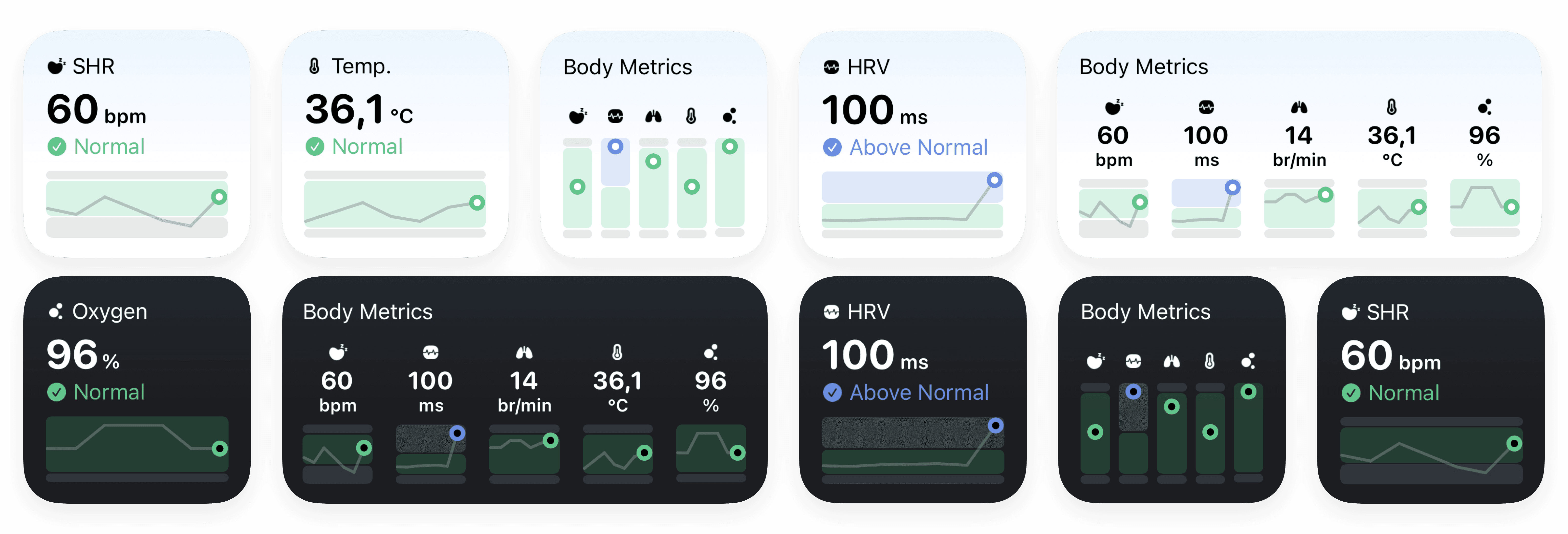
New Health Widgets
Various Health Metrics
All of your key health metrics - Sleeping Heart Rate (SHR), Heart Rate Variability (HRV), Oxygen Levels, Respiratory Rate and Wrist Temperature - are right there for you:
See the latest daily measurements and a 7-day trend.
When all is good, the chart is green. If there’s an outlier, it’ll turn orange or red—depending on how big the deviation is.
Don’t want to track a certain metric? You can exclude it from the Wellbeing tab (feature settings), and with that from the widget.
Single Health Metric:
Same as above, but focused on the one metric you choose.
How It Works:
In the morning, the widget refreshes within half an hour after you wake up, no need to open Gentler Streak. (It takes a bit for nighttime data to process in Health and sync with us.)
Both widgets update every time you open the iPhone app.
How to Set a Widget:
If you like the sound of that, here’s how to bring your wellbeing front and center on your Home Screen:
From the Home Screen, touch and hold a widget or an empty area until the apps start to jiggle.
Tap Edit in the upper-left corner.
Tap Add Widget.
Select a widget you want, choose its size, and then tap Add Widget.
Tap Done, and you're all set! :)
You may ask: “What about complications?”
Complications for health metrics are tricky, which is exactly why we haven’t done them yet. The synchronisation flow between HealthKit, iPhone, and Apple Watch isn’t the most reliable nor timely, which equals a lot of loose ends that potentially lead to a poor user experience—aka unhappy people. For now, we will let this be and rather focus on features we can execute well on all levels.
New RPE Insights
You might’ve noticed the RPE acronym popping up more since last September when Apple introduced the Rate of Perceived Exertion (RPE) to their workout tracking.
The RPE has been in Gentler Streak for two years, tucked at the bottom of your workout summaries. The concept isn’t super intuitive, and even though we try to lead with guidance, sometimes it’s used in ways that do more harm than good. So, we’ve added extra context:
What is RPE?
How to Use RPE
You can find both articles in the Insights tab.
Valentine’s Special Offer 💓
For two days, we’re offering a special 40% off a yearly Gentler Streak subscription, with the option to add up to 5 people to your family account for free. The offer expires on Friday, February 14, 2025, at midnight local time. Offer is valid for old users on a free plan and newcomers.